

Finding Specific Drone Models Online: A How-To Guide
Table of Contents
- Finding Specific Drone Models Online: Start With a Plan
- How to Identify a Drone Model: Read the Labels and Specs
- Drone Model Number Lookup: Use Search Operators and Databases
- Where to Buy Discontinued Drone Models Without Getting Burned
- How to Verify a Drone Seller Before You Pay
- Physical Drones vs. 3D Models and Scans: Know What You're Downloading
- Custom Build Compatibility: Frames, Components, and File Formats
- Conclusion
- Frequently Asked Questions
Last Updated: October 21, 2026
Finding Specific Drone Models Online: Start With a Plan
Finding specific drone models online starts with knowing exactly what you're looking for before you open a search tab.
Here's the core problem: most people search a brand name and hope. A better approach is to treat it like detective work. Gather the model number, the frame style, and the camera specs first.
Below, we'll show you a repeatable workflow that takes you from a blurry photo or a vague memory to a confirmed model.
How to Identify a Drone Model: Read the Labels and Specs
To identify a drone model, check the airframe label, the battery bay, and the controller first. These three spots carry the manufacturer's model number, which is the fastest path to a confirmed match.

Start with the physical clues. Most drones print a model or part number somewhere on the body. Look underneath the arms, inside the battery compartment, and on the back of the remote.
Check the airframe, battery bay, and controller
Work through these spots in order:
- Airframe: Look for a sticker or etched number on the underside or arm joints.
- Battery bay: Model codes are often molded into the plastic where the battery sits.
- Controller: The remote usually carries a matching model or frequency label.
- Camera module: Some drones print the lens or sensor spec here.
- Box and manual: If you have them, the box label is the most reliable source.
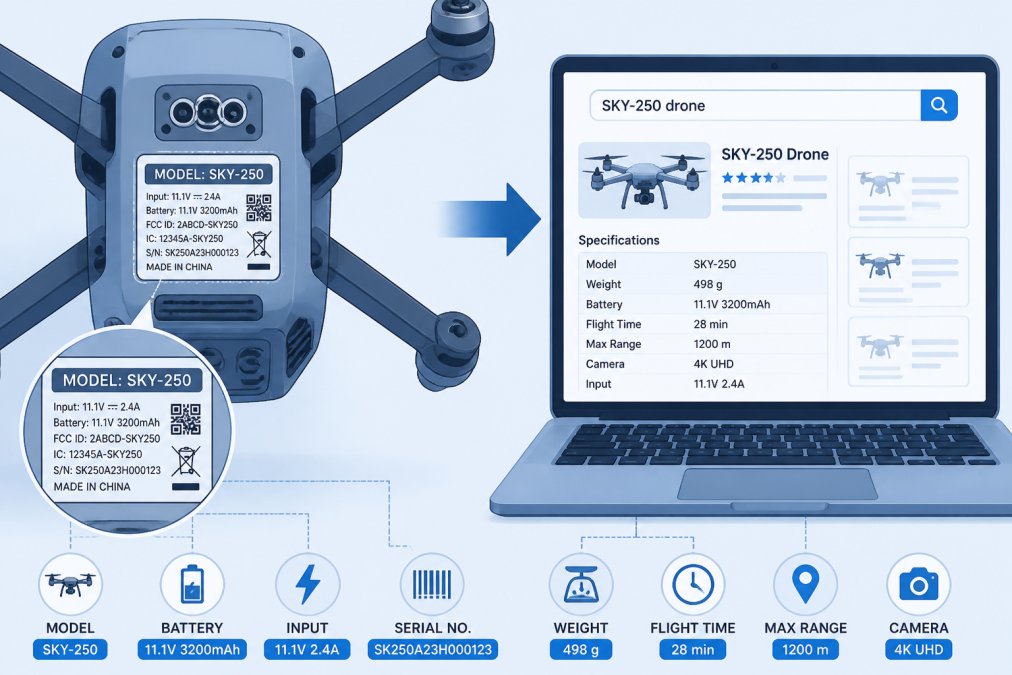
Once you have a number, write down the frame size, camera specs, and battery type. Those details help you confirm the match later.
Drone Model Number Lookup: Use Search Operators and Databases
A drone model number lookup works best when you treat it as a narrowing funnel, not a single search. Put the model number in quotes, add the word "specs," and filter by images to compare. Then work down through manufacturer documentation, retailer listings, and owner reports until two independent sources agree on the same airframe, camera, and battery. That agreement is what confirms the model.
Build the query in layers
Start broad enough to catch spelling variants, then tighten. A workable sequence:
-
"B-352", the bare number in quotes. This catches listings, forum threads, and manuals that use the code but not the marketing name. -
"B-352" drone specs, adds the category word so you skip unrelated products that share the number. -
"B-352" site:dji.com(or the relevant manufacturer domain), restricts results to the maker's own pages, which is where official spec sheets live. -
"B-352" filetype:pdf, surfaces manuals, quick-start guides, and spec documents that sellers rarely bother to copy. -
drone "B-352" review, pulls owner photos and feedback, which is where you catch a listing that mislabels the model.
Search operators are not decoration. The quotes force an exact-phrase match so a search for B-352 does not drift into B-350 or B-3520. The site: operator is the fastest way to reach a manufacturer's support and spec pages without scrolling through resellers. The filetype: operator reaches PDFs that plain web results bury.
Cross-check against real databases and documents
Once the query returns candidates, verify against sources that are hard to fake:
- Manufacturer support pages: The official product page and user manual carry the model number, dimensions, camera sensor, flight time, and battery part number. This is the anchor source.
- FCC equipment authorization records: Most drones with radio transmitters carry an FCC ID on the label. Searching that ID in the FCC's equipment authorization database confirms the manufacturer and the radio module, which helps separate a genuine model from a clone.
- Retailer spec sheets: Use these to confirm availability and price, but treat copied descriptions with suspicion, errors propagate from listing to listing.
- Owner forums and review photos: Real photos of the label, battery bay, and controller are the best tiebreaker when two models share a shell.
Refine by intent, not just by name
The same model number can point to a physical aircraft, a replacement part, or a 3D asset. Add an intent word to the query to separate them: "B-352" for sale for aircraft, "B-352" battery or "B-352" propeller for parts, and "B-352" STL or "B-352" 3D model for files. If a result set mixes all three, the intent word is what cuts it down to the type you actually want.
FCC equipment authorization database search
Where to Buy Discontinued Drone Models Without Getting Burned
Buying discontinued drones is where most people get hurt. The model is out of production, listings are thin, and sellers know you're motivated. Slow down and check the seller before you send money.
Start with these checks:
- Confirm the model still exists: Search the number plus "discontinued" to see if parts and support are gone.
- Read the return policy: A no-return listing on a discontinued item is a red flag.
- Check the seller's history: Look for reviews that mention drones specifically, not just generic praise.
- Ask for real photos: Request a picture of the actual unit with the model label visible.
This is also where a sourcing service earns its keep. If a model is out of stock everywhere, a shop that hunts down specific items can save you from piecing together sketchy listings. Tools, Handbags, and More offers custom sourcing for exactly this situation.
How to Verify a Drone Seller Before You Pay
To verify a drone seller, confirm their contact details, return terms, and business identity before paying. A legitimate seller answers questions plainly and stands behind the sale. A risky one dodges specifics.
Run through this checklist:
- The site lists a real business address and phone number
- The return policy is written out, not buried
- Reviews mention the product category, not just shipping speed
- Payment goes through a traceable method, not a direct transfer
- The seller responds to a pre-sale question within a day
If a seller can't confirm the model number, walk away. There are always other listings.
Physical Drones vs. 3D Models and Scans: Know What You're Downloading
A drone model online is not always a drone you can fly. Many search results are 3D models, scans, or design files for software, not physical aircraft. Knowing which one you're looking at saves you from a wasted download or a wrong purchase, and the fastest way to tell is to read the file extension and the listing language before you click anything.
Here's how to tell them apart:
| What you're looking at | File or format | What it's for |
|---|---|---|
| Physical drone | Product listing, box, specs | Flying, photography |
| 3D model | STL, OBJ, FBX, GLB | 3D printing, games, design |
| Drone scan | Photogrammetry, point cloud | Mapping, AR/VR, reference |
| 2D/3D map | Image or terrain file | Surveying, landscape work |
Read the signals in the listing
A physical aircraft listing talks about flight time, camera resolution, battery capacity, and warranty. A 3D asset listing talks about polygon count, file format, texture resolution, and license.
For scans and photogrammetry, the giveaway is the word "point cloud" or a file format like LAS, PLY, or OBJ paired with a capture date. These are reference models built from photos, not flyable hardware, and they are usually sold for mapping, surveying, or AR/VR work.
Verify before you download or buy
For a digital asset, check three things before you commit:
- License: Confirm whether the model is for personal, commercial, or editorial use. A free download often carries a non-commercial restriction that rules out client work.
- Dimensional accuracy: If you plan to 3D print or fit the model to real components, look for stated dimensions or a scale reference. A model that looks right but is not dimensionally accurate will not accept real motors or batteries.
- File integrity: Prefer downloads from established marketplaces with preview renders and reviews over random file hosts. A corrupt STL or a model with flipped normals wastes print time.
For a physical aircraft, the verification is the reverse: confirm the model number against the manufacturer's manual, check the seller's return policy, and make sure the listing shows the actual unit rather than a stock photo.
Custom Build Compatibility: Frames, Components, and File Formats
Custom build compatibility comes down to three things: frame dimensions, component specs, and file format. A specific frame only fits certain motors, props, and batteries, so check each part against the frame's listed dimensions before you buy.
For a complete build, confirm:
- Frame size: Match motor mount spacing and prop size to the frame.
- Battery: Check voltage and connector type against the frame's bay.
- Controller and receiver: Confirm they pair with your chosen flight system.
- File format: For 3D-printed parts, use STL for printing and OBJ or GLB for design work.
If you're sourcing a frame or part that's hard to find, our custom sourcing team can track down specific components, not just full drones.
Conclusion
The hardest part of finding a drone model online isn't the search, it's knowing what you're actually looking for. Get the model number, verify it against real specs, and check the seller before you pay. Do those three things and most of the risk disappears.
If a model is out of stock or discontinued, don't settle for a sketchy listing. Tools, Handbags, and More offers custom sourcing for hard-to-find drones and parts, plus a catalog that includes options like the New Drone Mini Pro B-352 at $60.00 and the New Drone HD Ultra with hover function at $125.00.

Frequently Asked Questions
How do I find the exact model of a drone online?
Start by checking the drone's body, battery compartment, and controller for a label with the manufacturer and model number. Then search that number in quotes on Google or use a dedicated drone database. Compare photos and specs from at least two sources to confirm. If the model is older, try retailer archives or hobby forums. For current models, you can also browse a retailer's drone collection directly. Tools, Handbags, and More offers a custom sourcing service if you can't find the exact model elsewhere.
Where can I search for a discontinued drone model?
Discontinued drones often appear on marketplaces like eBay, specialty hobby shops, and clearance sections of online retailers. Use the model number in your search and set alerts. Check forums where enthusiasts buy and sell used gear. Verify the seller's history and return policy before purchasing. If you need help, a custom sourcing service can track down discontinued models through supplier networks. Tools, Handbags, and More specializes in finding items not currently in stock, including older drone models.
How can I tell whether an online drone listing is for the exact model I want?
Cross-check the listing's photos, model number, and specifications against the manufacturer's official page or a trusted database. Look for clear images of the label and packaging. Ask the seller for additional photos if needed. Be wary of listings that use generic images or vague descriptions. A legitimate listing will include specific details like dimensions, weight, and camera specs. If the price seems too low, it may be a different model or a scam.
How do I avoid scams when buying a hard-to-find drone online?
Verify the seller by checking reviews, business registration, and return policy. Use payment methods with buyer protection, like credit cards or PayPal. Avoid wire transfers or gift cards. Ask for a video of the drone in action if buying used. Confirm the model number matches the listing. For high-value purchases, consider using an escrow service. Tools, Handbags, and More offers personalized assistance and a track record of sourcing specific items, which reduces the risk of scams.